
Editing Photos with AI There’s a specific kind of dread that comes with opening five hundred wedding photos after a long weekend shoot, knowing every single one needs some level of editing before a client ever sees them. Skin tones to balance. Blemishes to soften. Backgrounds to clean up. Exposure to fix on the shots taken against a bright window. Multiply that by every event, every client, every deadline, and you start to understand why photo editing has quietly been one of the most exhausting parts of photography for as long as the craft has existed.
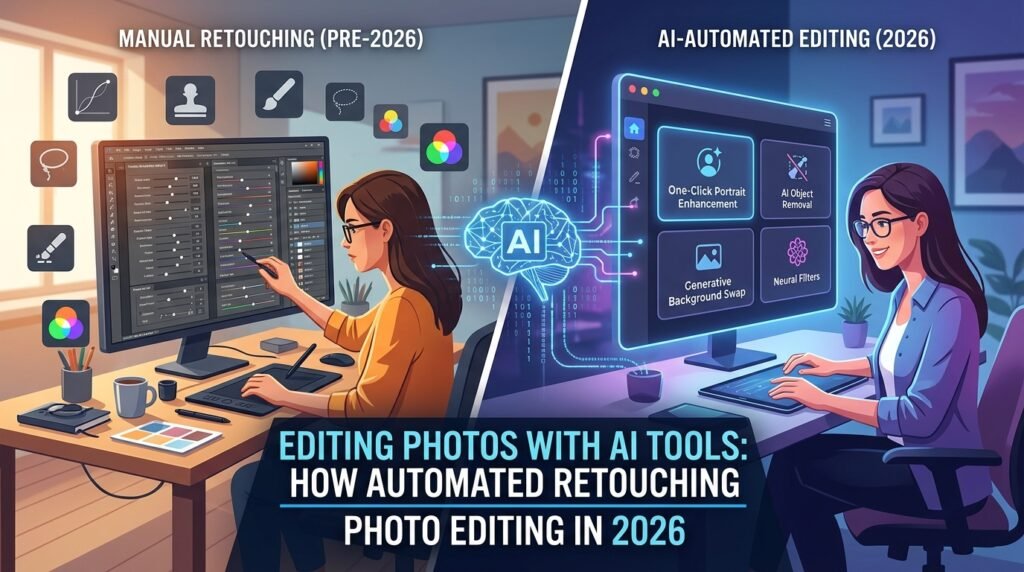
AI didn’t invent photo editing, obviously. Retouching has been a skill since the darkroom era. But what AI did was fundamentally change the math on how long that skill takes to apply, and who gets to apply it. A process that used to require years of Photoshop mastery and hours per image can now happen in seconds, sometimes with results good enough that even trained eyes have to look twice.
That’s not hype. It’s just where things are. But it also raises a genuinely interesting question worth sitting with: if a computer can smooth skin, fix lighting, and remove a stray tourist from a vacation photo in seconds, what’s actually left for the human behind the camera to do? That’s what this piece is really about — not just how to use these tools, but how to use them well, without losing the judgment that makes a photo genuinely good rather than just technically clean.
Table of Contents
- What AI Photo Editing Actually Means
- How Automated Image Retouching Works Under the Hood
- The Core Categories of AI Photo Editing Tools
- Step-by-Step: A Realistic AI Editing Workflow
- What AI Genuinely Does Better Than Manual Editing
- Where AI Editing Still Falls Short
- Real-World Applications Across Different Fields
- Mini Case Studies: How Different Photographers Actually Use This
- The Ethics of Automated Retouching
- Tips for Getting Natural-Looking Results
- Where AI Photo Editing Is Headed Next
- Final Thoughts
- FAQ
What AI Photo Editing Actually Means(Editing Photos with AI)
The term gets used loosely, so it’s worth being precise about what it actually covers, because “AI photo editing” isn’t one single feature it’s an umbrella over a fairly wide range of capabilities.
At the simplest end, you have automated adjustments: software that analyzes a photo and applies corrections for exposure, color balance, and contrast without you manually dragging a single slider. A step further, you get automated retouching specifically smoothing skin, removing blemishes, whitening teeth, evening out skin tone tasks that used to require careful, manual brush work.
Beyond that, there’s object removal and background Editing Photos with AI AI identifies unwanted elements in a photo (a stray object, a photobomber, a distracting background detail) and convincingly fills in what should logically be there instead. And at the most advanced end, there’s generative editing, where AI doesn’t just correct or remove it actually creates new visual content within the Editing with AI photo, extending a background, adding elements that weren’t there, or entirely reimagining part of the scene based on a text description.
Understanding which category you actually need matters enormously, because a tool built for one of these purposes isn’t necessarily good at the others.
How Automated Image Retouching Works Under the Hood

You don’t need to become a machine learning engineer to use these tools well, but a basic understanding of what’s happening helps you know when to trust the automation and when to double-check its work.
Most AI retouching tools are trained on massive datasets of photographs, Photos Editing with AI often paired with examples of professionally edited versions of similar images. Through that training, the model learns to recognize patterns what skin typically looks like under good lighting, what a blemish looks like versus a natural skin texture worth preserving, what a shadow should look like given a particular light source.
When you run a photo through one of these tools, it’s essentially applying learned patterns about what “good” looks like to your specific image, adjusting pixel by pixel based on what it’s identified as needing correction. For object removal specifically, the software identifies the boundaries of the unwanted element, then generates new pixel content for that area based on the surrounding context, essentially predicting what would logically be there if the object weren’t in the frame.
This is why AI retouching sometimes produces subtly strange results in unusual situations a repeating pattern that gets slightly distorted where an object was removed, or skin smoothing that overcorrects on someone with naturally textured skin the model didn’t have enough similar training examples for. The Photos Editing Photos with AI isn’t reasoning about your specific photo the way a human editor would; it’s applying statistical patterns learned from a huge number of other photos, which usually works remarkably well but occasionally shows its limitations in edge cases.
The Core Categories of AI Photo Editing Tools
One-click automatic enhancement tools. These analyze a photo and apply a full set of corrections instantly exposure, color, sharpness, sometimes even style designed for people who want a dramatically improved photo with zero manual adjustment. Popular in mobile apps aimed at casual users who want great-looking Editing Photos with AI without learning traditional editing software.
Portrait and skin retouching specialists. Built specifically around the demands of portrait, wedding, and headshot photography smoothing skin naturally, evening tone, removing temporary blemishes while preserving texture, and adjusting features subtly without an obviously “airbrushed” look.
Object and background removal tools. Designed for cleaning up distracting elements from a scene power lines, background strangers, litter, or replacing a background entirely, useful for both personal photos and product photography.
Generative fill and expansion tools. These let you extend the edges of a photo beyond its original frame, or replace entire sections of an image with newly generated content based on a text prompt, opening up creative possibilities well beyond traditional correction and cleanup.
Batch processing and workflow tools. Built for photographers dealing with large volumes of similar images event photographers, real estate photographers, e-commerce product photographers who need consistent edits applied across hundreds or thousands of photos without manually adjusting each one.
Step-by-Step: A Realistic AI Editing Workflow(Editing Photos with AI)
Here’s how a sensible editing workflow tends to look once AI tools are incorporated thoughtfully, rather than used as a single magic button.
Step one: Cull before you edit. AI speeds up editing dramatically, but it doesn’t help you decide which photos are actually worth editing in the first place. Go through your shoot and select the images worth your time before running anything through automated tools.
Step two: Apply automated global corrections first. Let AI handle the baseline work exposure, white balance, basic color correction across your selected images. This is where automation saves the most time with the least risk, since these adjustments are usually fairly objective.
Step three: Move to automated retouching for portraits. If you’re working with people, apply AI-based skin smoothing, blemish removal, and tone evening as a starting point, but resist the instinct to accept the default intensity blindly.
Step four: Review at full resolution, not thumbnail size. Small errors and overcorrections are often invisible at thumbnail size but painfully obvious once a client views the image full-screen or prints it. Always review your AI-assisted edits zoomed in before finalizing.
Step five: Manually adjust intensity where needed. Most quality AI retouching tools let you dial back the effect if it looks overdone. Use this liberally the goal is enhancement, not erasing someone’s actual face.
Step six: Handle removals and cleanups individually. Object removal tools generally work best when applied thoughtfully to specific problem areas rather than run as a blanket automated pass across an entire batch.
Step seven: Do a final consistency pass across the full set. If you’re delivering a batch of images a wedding gallery, a product catalog look through the finished set together to make sure the automated edits didn’t create noticeable inconsistencies in tone or style between similar shots.
What AI Genuinely Does Better Than Manual Editing
Speed on repetitive, high-volume work. This is the single biggest advantage, without much competition. Editing Photos with AIfive hundred similar event photos manually might take days; AI-assisted batch processing can compress that into hours, with much of the heavy lifting happening automatically.
Consistency across large batches. Human editors get tired, and fatigue shows up as subtle inconsistency across a long editing session. AI tools apply the same logic uniformly across hundreds of images, which is genuinely valuable for things like real estate listings or e-commerce catalogs where visual consistency matters.
Accessibility for non-experts. Someone without years of Photoshop training can now produce polished, professional-looking results on their own photos, which matters enormously for small business owners managing their own marketing without a design budget.
Object removal that used to require serious skill. Cleanly removing an object from a photo used to be one of the harder manual editing Photos with AI skills to master. AI tools have made a genuinely difficult task accessible to casual users in a way that’s hard to overstate.
Where AI Editing Still Falls Short
Nuanced, artistic judgment. AI can apply technically correct adjustments, but it doesn’t understand why a particular shadow adds emotional weight to a photo, or why a slightly imperfect, candid moment might be more valuable than a technically “corrected” one. That judgment still belongs entirely to the human behind the edit.
Overcorrection and the uncanny look. Left on default settings, a lot of Editing Photos with AI skin retouching tools overcorrect, producing that overly smooth, slightly plastic look that experienced editors and photographers immediately recognize and often dislike. Getting a natural result usually still requires a human dialing the intensity back.
Unusual or complex scenes. Object removal and generative fill tools tend to struggle with complicated backgrounds, repeating patterns, or scenes with unusual lighting, sometimes producing visible artifacts or inconsistencies that a trained eye will catch immediately, even if a casual viewer might not.
Preserving individual character. This is worth taking seriously, especially in portrait work. Overzealous automated retouching can subtly erase the specific features that make someone look like themselves a distinctive freckle pattern, a particular skin texture, a scar with real personal meaning. Good editing enhances a person; it shouldn’t quietly erase them.
Real-World Applications Across Different Fields
Wedding and event photography. Photographers delivering hundreds or thousands of images from a single event rely heavily on AI-assisted batch editing to meet realistic turnaround times without sacrificing their own wellbeing in the process.
E-commerce and product photography. Online retailers use AI background removal and enhancement to produce clean, consistent product images at scale, a task that would be prohibitively expensive to handle manually across a large catalog.
Real estate photography. Automated tools help correct exposure across the notoriously tricky lighting conditions common in interior shots, and can remove minor clutter or distracting elements from a room without a full manual retouching session.
Social media and personal branding. Individuals managing their own content, from small business owners to freelance creators, use AI photo editing to produce polished visuals without the time or budget for a dedicated editor.
Journalism and documentary work. This one comes with more caution attached. While basic Editing Photos with AI corrections for exposure and color are common, the ethical standards around what’s acceptable to alter in documentary and journalistic photography are considerably stricter, and many publications have explicit policies restricting the use of generative editing tools that add or remove real content from a factual image.
Mini Case Studies: How Different Photographers Actually Use This
A wedding photographer managing back-to-back summer bookings. She uses AI batch Editing Photos with AI to apply consistent baseline color correction and exposure fixes across an entire wedding gallery immediately after import, cutting what used to be a full day of initial editing down to under an hour. She still manually reviews and fine-tunes the hero shots the first kiss, the ring exchange by hand, reserving her personal editing time for the images that matter most rather than spreading it evenly across every single frame.
A small online boutique owner shooting her own product photos. With no design budget and a phone camera, she uses AI background removal and lighting correction to produce clean, consistent listing Editing Photos with AI photos that look considerably more professional than her raw shots, without hiring outside help.
A real estate agent handling her own listing photography. She relies on automated exposure correction to balance the difficult lighting in rooms with bright windows and darker interior corners, a task that used to require manual HDR blending and noticeably more time per photo.
A portrait photographer specializing in natural, editorial-style work. He uses AI retouching tools but consistently dials the default intensity down significantly, treating the automation as a light touch-up rather than a full transformation, specifically because his clients book him for a natural aesthetic that heavy automated smoothing tends to undermine.
The Ethics of Automated Retouching(Photos Editing with AI)
This deserves honest treatment rather than a quick dismissal, because the ease of these tools has real consequences worth thinking through.
The core tension is this: the same technology that saves a professional hours of tedious work also makes it trivially easy to alter someone’s actual appearance in ways that drift from healthy self-image toward something more troubling. Research and public conversation around social media and mental health have increasingly pointed to heavily retouched, unrealistic imagery as a contributing factor in body image struggles, particularly among younger audiences. That context matters when deciding how aggressively to apply automated retouching, especially in personal or influencer content aimed at younger viewers.
There’s also a growing expectation of disclosure in certain contexts. Some regions and platforms have begun exploring requirements around labeling significantly retouched or AI-altered images, particularly in advertising, precisely because of concerns about unrealistic beauty standards and consumer deception. Photos Editing with AI Even where it’s not legally required, being thoughtful about how much you alter a photo and being transparent about it when it matters is a reasonable professional standard worth holding yourself to.
And in fields like journalism, documentary photography, and any context where a photo is presented as factual record, the line is considerably firmer. Adding, removing, or fabricating visual content in an image meant to represent real events crosses from editing into fabrication, and reputable publications treat that distinction seriously.
Tips for Getting Natural-Looking Results
Start with a light touch and build up, not the reverse. It’s much easier to apply more retouching than to walk back an overcorrected result. Begin conservatively and increase intensity only if the photo genuinely needs it.
Compare before and after side by side, not just the final result alone. Overcorrection is much easier to spot in direct comparison than when you’re only looking at the final edited version in isolation.
Preserve texture, don’t erase it. Genuine skin has texture, and completely smoothing it away tends to look artificial rather than flattering. Many tools offer texture preservation settings specifically to avoid the overly smooth, plastic look.
Zoom in on edges after object removal. The area immediately surrounding a removed object is where artifacts and inconsistencies are most likely to hide, so always inspect that specific region closely before finalizing.
Get a second opinion when something looks slightly off but you can’t identify why. Fresh eyes, whether a colleague or even just returning to the image after a break, often catch subtle overcorrection that becomes invisible after staring at the same photo for too long.
Where AI Photo Editing Is Headed Next
More precise, localized control. Expect tools to keep improving at letting users apply automated adjustments to very specificareas of a Photos Editing with AI without affecting the rest, narrowing the gap between “fully automated” and “fully manual” editing.
Better handling of complex, unusual scenes. As training data and model sophistication improve, expect object removal and generative editing to handle previously tricky scenarios complex patterns, unusual lighting, crowded scenes with considerably fewer visible artifacts.
Stronger built-in ethical guardrails. Given the ongoing public conversation around unrealistic beauty standards and image manipulation, expect more tools to build in features that flag heavy alterations or make natural-looking defaults the standard, rather than aggressive smoothing being the default setting.
Tighter integration between generation and correction. The line between Editing Photos with AI an existing photo” and “generating new visual content” is likely to keep blurring, with tools increasingly letting you both correct and creatively expand an image within the same workflow.
Final Thoughts
AI photo editing didn’t replace the photographer’s eye it replaced the tedious, repetitive part of the job that never actually required that eye in the first place. The exposure correction, the batch consistency, the basic cleanup work: that’s exactly the kind of labor worth automating, freeing up real human attention for the decisions that actually shape whether a photo feels alive or just technically correct.
The photographers and editors getting the most out of these tools aren’t the ones who’ve handed over full creative control to an algorithm. They’re the ones using AI to clear away the tedious groundwork, so they have more time and energy left for the part of the craft that a computer still can’t do: knowing which imperfect, slightly messy, completely real moment is actually the one worth keeping.
If you’re just getting started with AI photo editing, don’t chase the most dramatic transformation a tool can offer. Chase the most honest one. Start light, review carefully, and let the technology support your eye instead of replacing it.
FAQ
1. Will AI photo editing tools completely replace professional photo editors? Unlikely in the near term. AI handles repetitive, technical corrections extremely well, but nuanced creative judgment, consistency of artistic vision, and knowing which imperfections to preserve still require human experience and taste.
2. Is AI skin retouching safe to use for professional client work? Yes, when used thoughtfully. The key is dialing back default intensity settings to avoid an artificial, overly smooth look, and reviewing results at full resolution before delivering final images to a client.
3. Can AI tools remove objects from photos without leaving visible artifacts? Often, yes, especially with simple backgrounds. Complex scenes, repeating patterns, or unusual lighting conditions are more likely to produce visible inconsistencies that require manual touch-up.
4. Do I need expensive software to start using AI photo editing? No. Many mobile apps and free or low-cost tools now include capable AI-powered editing features, making this accessible without a significant upfront investment, though professional-grade tools do offer more control for advanced work.
5. Is it ethical to heavily retouch photos with AI, especially for social media? It depends heavily on context and disclosure. Light enhancement is generally considered normal, but significantly altering someone’s appearance without any transparency, particularly in contexts that could affect others’ body image expectations, raises legitimate ethical concerns worth taking seriously.
6. How can I avoid the “overly smoothed” AI look in my edited photos? Reduce the default retouching intensity, prioritize tools with texture-preservation settings, and always compare your edited image against the original before finalizing to catch overcorrection early.
7. Are there situations where AI photo editing shouldn’t be used at all? Yes particularly in journalism, documentary photography, or any context where an image is presented as an accurate factual record. Adding, removing, or fabricating content in those situations crosses an important ethical line that most professional standards explicitly prohibit.
Read about Machine Learning